Events are temporary, but performers and venues create durable ways to explore them. PI Events for SeatGeek can turn those entities into connected WordPress discovery journeys: visitors open a directory, search or browse records, visit a profile and continue to upcoming event cards and ticket destinations.
Searchable SeatGeek performer and venue directories for WordPress are included with Business and Developer.
What the directory landing pages do
The Performer Directory and Venue Directory are not merely admin search tools. They are frontend landing pages built for visitors. A performer directory can expose artists, teams or other event participants; a venue directory can organize places by name and location. Each result leads to a profile that contains entity information and relevant upcoming SeatGeek events.
This structure creates a sensible end goal: event cards connect to entities, entity profiles connect back to upcoming events, and the directories provide stable entry points for browsing.
A four-step setup wizard
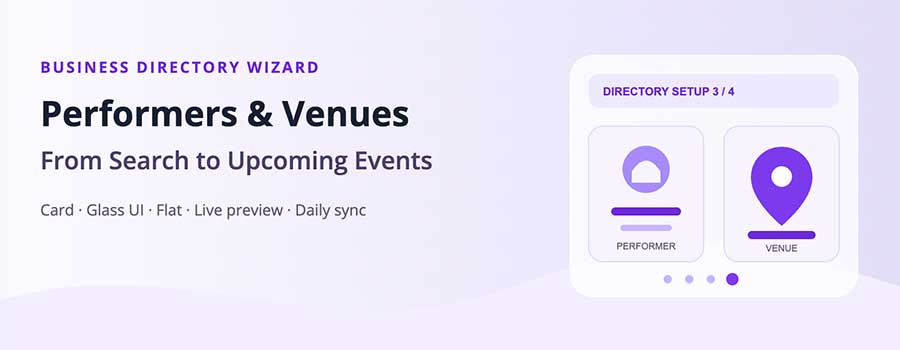
Business opens a modal Wizard that configures both directories in one guided flow. The administrator can create draft WordPress landing pages or assign existing pages, choose directory behavior, select a visual theme, inspect a live preview and complete the setup. Creating pages as drafts preserves editorial control before anything becomes public.
The Wizard offers three designs:
- Card: a structured, familiar directory grid.
- Glass UI: translucent surfaces and layered depth for a more polished visual treatment.
- Flat: a restrained presentation that blends easily into content-heavy themes.
Individual Display on Pages screens retain the 50/50 form-and-preview layout for later adjustments.
Virtual profiles versus imported entity records
Standard includes virtual performer and venue profiles plus [sg_performer], [sg_venue], [sg_performer_events] and [sg_venue_events]. This lets a focused site create entity-specific experiences without building complete searchable directories.
Business adds imported pisg_performer and pisg_venue records, the searchable [sg_performers] and [sg_venues] directory shortcodes, and daily entity synchronization. Administrators can find and import performer or venue records from SeatGeek, while synchronization keeps relevant metadata current.
Categories connect the discovery experience
SeatGeek event taxonomies help group events and entities into meaningful paths. Used carefully, a site can create a hierarchy such as city → venue → performer → event or category → performer → upcoming events. That is more useful than presenting visitors with a single undifferentiated API result page.
What to prepare before opening the Wizard
Decide whether the directory pages already exist and whether they should be published immediately. The safer launch process is often to let the Wizard create draft pages, review their titles and introductory copy, then publish after testing. Also identify the visual theme that best matches the site and the fields visitors need when scanning directory results.
A city guide may prioritize venue location. A music publication may emphasize performer imagery and genre. A broad event portal may need search and generous result counts. These decisions should shape the directory rather than forcing every project into the same card.
The four-step directory setup process
- Choose the directory type and pages: create draft performer and venue landing pages or assign suitable existing pages.
- Configure browsing: select search behavior, result density, columns and relevant filters.
- Select the visual theme: compare Card, Glass UI and Flat in the live preview.
- Review and create: confirm the choices, save assignments and inspect the draft frontend pages.
The Wizard establishes the starting structure. The individual Performer Directory and Venue Directory screens support later changes, with configuration and preview kept side by side.
Importing the right entities
Business administrators can search SeatGeek for performers and venues rather than manually transcribing entity data. Import only the records that support the site’s audience and event coverage. A local portal might begin with its most active venues and recurring performers, then expand the catalog as traffic and content grow.
Imported entity records provide WordPress-native objects and daily synchronization keeps selected SeatGeek metadata current. Editors can add original context around those records, but should avoid overwriting synchronized fields without understanding which values the next sync controls.
Directory SEO and visitor experience
A directory landing page benefits from an original explanation of its scope, descriptive headings and links to important categories or locations. Profile pages should answer a visitor’s immediate question and make upcoming events easy to find. Empty profiles, overly broad directories and duplicate archive paths can weaken the experience, so launch with a deliberate set of useful records.
Use clear search labels, meaningful card text and layouts that remain readable on mobile. Cache policies should reflect entity stability: profiles can often remain cached longer than rapidly changing upcoming-event collections.
Extending directories with Developer
Developer REST routes allow a mobile app or headless frontend to retrieve performers, venues and their related events. Template overrides adapt profile markup inside a custom WordPress theme. ACF synchronization can connect selected entity values to an existing field architecture, and entity-sync webhooks can notify an external system when data changes.
Which licence should a directory site use?
Choose Standard if virtual entity profiles and individual entity shortcodes are sufficient. Choose Business for the Wizard, directory landing pages, three themes, imported entities, daily synchronization and directory shortcodes. Choose Developer when those directories must also be exposed to external applications, customized through theme template overrides, synchronized with ACF or connected through webhooks. Every tier is for one server-verified domain.
Plan your performer and venue directory →